Master Your Etsy Shop: The Ultimate Guide to Free Planner Listing Mockups
When you sell digital planners, journal templates, or printable organizers on Etsy, your product images are often the first—and sometimes only—chance you get to make a lasting impression. In a marketplace packed with thousands of similar listings, a standout visual can mean the difference between a sale and a scroll-by. That's where a free planner Etsy listings mockup comes into play. These ready-made, customizable templates let you showcase your digital products in realistic, lifestyle-oriented settings without needing a professional photographer or expensive design software. In this article, we will explain exactly what these mockups are, why they matter, how to use them effectively, and how they fit into the broader world of Etsy entrepreneurship, content creation, and digital product design.
What Is a Planner Mockup and Why Should You Care?
A mockup is essentially a pre-designed template that places your product—in this case, your planner pages, stickers, or inserts—into a realistic context. Think of it as a digital stage: you provide the star of the show (your product design), and the mockup provides the setting (a desk, a hand holding a planner, a tablet display, etc.). For Etsy sellers, especially those in the planner and stationery niche, mockups solve a fundamental challenge: how to present a digital product in a way that feels tangible, desirable, and credible.
The Core Purpose of a Planner Mockup
When you sell a digital planner, customers cannot touch, flip through, or test it before purchase. A well-crafted mockup bridges that gap by showing what the product looks like in real-world use. It gives shoppers a sense of scale, color accuracy, and usability. For instance, a mockup showing a planner open on a cozy desk with a cup of coffee and a pen instantly communicates "this is a practical, beautiful tool for organizing your life." That emotional cue is powerful and often drives purchasing decisions.
Moreover, mockups help establish brand trust. Sellers who invest in professional-looking visuals signal that they are serious about their craft. Conversely, a listing with flat, low-quality images—or worse, no image at all—can appear amateurish and untrustworthy. In the world of Etsy, where anyone can set up a shop, visual quality is a quick shorthand for credibility.
Understanding the Free Planner Mockup Landscape
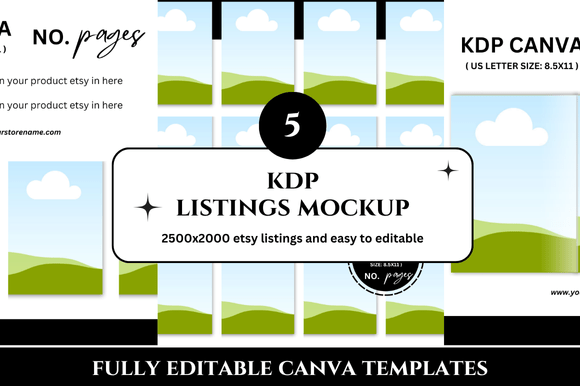
You might assume that "free" means limited, low-resolution, or difficult to customize. While some free mockups do fall short, many high-quality free planner Etsy listings mockups are generously offered by designers, bloggers, and Etsy educators as lead magnets or community resources. These mockups often come in PSD (Photoshop) format with smart object layers, or as Canva templates that require no special software. The key is knowing where to find them and how to adapt them to your unique product line.
Types of Free Planner Mockups You Will Encounter
- Lifestyle flat lays: Top-down shots of planners on desks, beds, or tables, often with props like pens, sticky notes, coffee cups, or plants. These are great for creating a warm, inviting vibe.
- Hand holding a planner: A photo of someone holding a planner open, offering a sense of scale and human connection. This is especially effective for bullet journal or habit tracker listings.
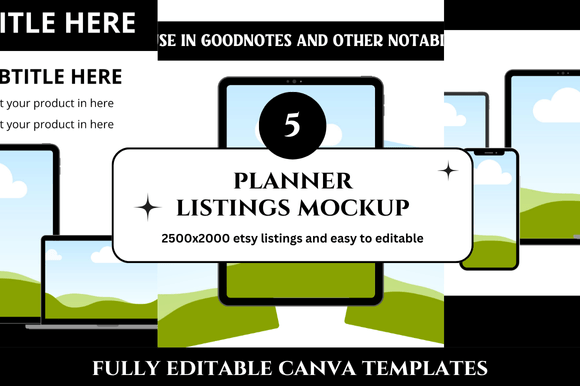
- Device-based mockups: Planners displayed on tablets, iPads, or laptops, ideal for digital planners used with apps like GoodNotes, Notability, or Remarkable.
- Isolated product shots: Clean, minimalist images of the planner alone, often used for the primary listing thumbnail or Etsy search results.
- Scene builders: Composite templates that include multiple elements like binder rings, tabs, and dividers, allowing you to create a more complex and branded imagery.
Each type serves a different purpose within your listing. A flat lay might be your hero image, while a device mockup could appear later in the photo set to show tech compatibility. Using a mix of mockup styles within a single listing helps tell a complete story about your product.
The Practical Relevance of Mockups for Modern Etsy Sellers
Running an Etsy shop today means juggling design, marketing, customer service, and SEO. The last thing a creative entrepreneur wants is to spend hours staging photos or learning advanced Photoshop techniques. Free mockups drastically reduce the time and skill barrier to professional-looking listings. You literally drop your design into a smart object, save the image, and upload it to Etsy. This efficiency allows you to focus on what you do best: creating beautiful planners and growing your business.
How Mockups Fit into the Buyer's Journey
When a potential customer searches for "weekly planner printable" or "digital habit tracker," they are often in a comparison stage. They are looking at multiple listings side by side. Your mockup is your silent salesperson. A compelling mockup can answer unspoken questions like "Will this look good in my bullet journal?" or "Can I use this on my tablet?" Without a mockup, buyers must use their imagination—which many are unwilling to do when they are about to spend money.
Furthermore, mockups support social proof and shareability. A beautiful mockup is more likely to be pinned on Pinterest, shared in planner enthusiast groups, or featured in Etsy search results. Because Etsy's algorithm favours listings with high-quality images, using mockups indirectly boosts your search ranking and click-through rate. It's a simple but powerful SEO strategy that many new sellers overlook.
Common Misunderstandings About Free Planner Mockups
One of the biggest misconceptions is that using a free mockup makes your shop look generic or overused. While it's true that some free templates are widely circulated, the risk is lower than you might think—especially if you customize the mockup with your own colors, props, or overlays. Additionally, many free mockups are high enough quality that they can be used for months without looking stale. The key is to choose mockups that align with your brand style and to rotate them periodically to keep your shop feeling fresh.
Another misunderstanding is that mockups are only for digital planners. In reality, any Etsy seller—whether they sell physical stickers, printed journals, or even digital art—can benefit from mockup-based photography. The technique transcends product type and is especially valuable for sellers who cannot afford a professional photoshoot.
How to Choose the Right Free Planner Mockup for Your Brand
Not all mockups are created equal. When you are evaluating a free planner Etsy listings mockup, consider the following criteria:
- Resolution and quality: The mockup should be at least 2000 pixels wide to look sharp on Etsy's image viewer and on mobile devices.
- Ease of use: If it's a Photoshop file, check that the smart object is clearly labeled. If it's for Canva, ensure all elements are editable without a watermark.
- License terms: Some free mockups are for personal use only, while others allow commercial use. Always read the terms to avoid copyright issues.
- Aesthetic alignment: The mockup's color palette, lighting, and props should complement your brand. A dark, moody mockup might clash with a bright, pastel planner line.
- Versatility: Choose mockups that can accommodate different planner sizes, orientations, and cover designs. This saves you from hunting for a new mockup every time you launch a product.
Where to Find High-Quality Free Mockups
Many design resource sites offer free mockups for Etsy sellers. Some popular sources include Creative Market (filter by free), Freepik, Mockup World, and Canva's template library. Additionally, many Etsy-specific blogs and YouTube channels offer free mockup packs as part of their educational content. A simple search for "free planner mockup for Etsy" can yield dozens of options. Always check the publication date to ensure the mockup is still trending and not tied to an outdated aesthetic.
Step-by-Step: Using a Free Planner Mockup in Your Etsy Listing
Let's walk through a typical workflow so you can see just how straightforward the process is:
- Step 1: Download the mockup file (usually a ZIP folder containing PSD or PNG files).
- Step 2: Open the file in Adobe Photoshop or upload it to Canva, depending on the format. If you do not have Photoshop, look specifically for Canva-compatible mockups—they are increasingly common and beginner-friendly.
- Step 3: Locate the smart object layer (often labeled "Insert Your Design Here" or simply "Mockup" with a thumbnail icon). Double-click to open it.
- Step 4: Paste or drag your planner design into this layer. Adjust the size and position if needed, then save and close the smart object. The mockup will automatically update with your design.
- Step 5: Add finishing touches like shadows, text overlays, or your shop name if the mockup allows. Then export as a high-resolution JPEG or PNG.
- Step 6: Upload the new image to your Etsy listing as the primary photo or as a secondary image. Consider adding minor color corrections in Canva or Lightroom to make the image pop.
This entire process can take as little as five minutes once you are familiar with the workflow. That is the power of a good mockup: it condenses hours of photography and editing into minutes of drag-and-drop simplicity.
Beyond the Listing: Mockups in Marketing and Content Creation
Your use of planner mockups should not stop at Etsy listings. These same images can be repurposed across your entire marketing ecosystem. You can use them on your Pinterest pins, Instagram posts, blog headers, email newsletters, and even as cover images for freebie downloads. Consistency in visual style across platforms builds brand recognition and reinforces your identity as a planner designer. Many successful Etsy sellers maintain a library of 10–20 mockups that they rotate for seasonal launches, sales, and social media content.
Mockups also play a role in content marketing. If you write a blog post about "5 Ways to Use a Digital Planner for Goal Setting," including a custom mockup of your planner in action makes the content more compelling and shareable. Readers are more likely to click through to your shop if they see your product integrated naturally into helpful content. This synergy between mockups and content is a cornerstone of modern Etsy SEO and audience building.
The Broader Context: Mockups and the Rise of the Digital Creator Economy
The availability of free planner Etsy listings mockups is part of a larger shift toward democratized design. Tools like Canva, Procreate, and affordable Photoshop alternatives have lowered the entry barrier for creative entrepreneurship. Mockups, in particular, allow individuals with no photography background to produce images that look like they belong in a magazine spread. This levels the playing field for small shop owners competing against larger, more established brands.
Moreover, as more people turn to side hustles and online businesses, the demand for digital products—especially planners—continues to grow. Mockups are a small but critical piece of infrastructure that supports this ecosystem. They enable creators to showcase their work professionally without sacrificing time or money that could be spent on product development and customer engagement. In essence, mockups are not just a design tool; they are a business efficiency tool.
Final Takeaways: Making the Most of Free Planner Mockups
If you are new to Etsy or looking to elevate your existing shop, start by collecting a small set of free planner mockups that resonate with your brand. Test them with a few listings and monitor your click-through and conversion rates. You will likely see a noticeable improvement in customer engagement. Remember that mockups are not a one-time fix but an ongoing asset that evolves with your shop. As you grow, consider investing in premium mockup packs or even custom mockups that are unique to your brand. However, for many sellers, the world of free mockups offers more than enough quality to build a successful, visually cohesive Etsy presence.
In the end, a mockup is more than just a pretty picture. It is a bridge between your creative work and the customer's imagination. By using free planner Etsy listings mockups effectively, you are not only saving time and money—you are also telling a story about your product's value, utility, and beauty. That story, told consistently across your shop and marketing, is what turns browsers into buyers and one-time customers into loyal fans.